Phone calls died in 2010, giving way to SMS. Social media apps then spelled the death of both SMS and human interaction. The emoji and, more specifically, its use as a substitute for meaningful conversation in messaging apps is but the latest way to pull us even further apart. Regardless of the inevitable downfall of society that will result, we can all agree that message reactions in WhatsApp couldn’t come a moment sooner. Messaging apps like Facebook Messenger, Instagram, and even Google’s recently-implemented RCS all feature seamless message reactions. Let’s have a look at how WhatsApp’s message reactions work, and how you can (maybe) get to try them out yourself.
Who can use WhatsApp message reactions?
Mark Zuckerberg announced on Instagram that the message reactions feature starts rolling out — finally exiting the beta program — on May 5 2022, so check the Play Store, App Store or APKMirror for the latest version of WhatsApp.
How do you react to a message in WhatsApp?
Message reactions were confirmed by WhatsApp’s head, Will Cathcart, in a video over on Twitter, and on the WhatsApp blog. If you’re a long-time user of other Meta messaging services, or pretty much any other major messaging platform, you’ll find the reactions to be intuitive. In case you’re not familiar with Facebook Messenger or Instagram’s messaging interface, reacting to a message is simple — just follow these steps:
Open WhatsApp (the same applies for Facebook Messenger and Instagram).
Long press the message to which you wish to react.
A pop-up will appear with six available emoji.
Select one of the six emoji in the pop-up to use that as the reaction.
Your message reaction will appear below the message you previously selected.
At launch, there will only be 6 emoji available, but as the feature develops, WhatsApp will add support for all emoji and skin tones that you can normally use in messages.
If you don’t see reaction notifications in WhatsApp, make sure you’ve updated the app. The update is being rolled out server-side, and it may take a few weeks for everyone to see notification reactions in WhatsApp.
According to WABetaInfo, WhatsApp is also beta testing a feature to enable or disable notifications for reactions to messages you’ve sent. You can locate the reaction notifications toggle under Settings -> Notifications as a toggle called Reaction Notifications.
You can see Will Cathcart’s Tweet and video confirming and demonstrating WhatsApp message reactions below:
Message reactions in WhatsApp are an easy way to eliminate unnecessary clutter that results from the current practice of sending emoji as reactions to messages — we’ve all been in those group chats and received back-to-back notification alerts because the whole group thought your aunt’s cat was the cutest thing around.
If you’re not into the idea of selling your data to Meta, Google Messages also has message reactions!
Sony makes some of the most popular audio accessories around, and the company’s always on our short list when we’re looking for the best wireless earbuds to buy. If you prefer a full-sized pair of headphones, Sony’s got just what you need, and its XM series has been one of our favorites for years — most recently with the XM4 back in 2020. So it’s easy to understand why we’re so excited to be checking out some early retail leaks for the next-gen Sony XM5 headphones.A series of photos showing off Sony’s box for model WH-1000XM5 has emerged on Reddit, giving us a little preview of what to expect. 9to5Google notes that earlier rumors suggested the XM5s could offer up to 40 hours of operation on a full charge, while the box here only mentions 30 hours of playback — not any better than what the last generation offered, but still pretty solid.
3 Images
The packaging also mentions support for Google Assistant — not that there’s any huge surprise there, given its presence on past models. And if you’re a fan of all that spatial audio processing, 360 Reality Audio appears to be making a return, as well.
While there’s no window on this box giving us a glimpse of the actual hardware, the art manages to show off a comfy-looking, no-frills build, a little reminiscent of the AirPods Max.
There’s still a lot left for us to learn about these headphones, but with an event scheduled for May 12, we should have all the rest of those details pretty soon.
The idea behind communicating, sharing, and collaborating through email is just about as old as the early days of the internet. Even decades later, things aren’t all too different regarding how we interact with email in our world today. We continue to use email for work, school, play, and especially in our personal lives for everything else in between. And while checking your email was a semi-regular activity a decade ago, now it’s always available, thanks to our phones.
Our email accounts can also get cluttered via junk or other unwanted threads, which can cause us to miss important messages. With this guide, we wanted to highlight some interesting apps and tools for the desktop version of Gmail that can help keep your inbox in check. You should be in charge of your inbox, not the other way around. And there are plenty more options for Gmail than what’s shown here, so don’t worry if your favorite app didn’t get a proper shoutout.
The third-party apps and tools on this list come from the official verified Google Workspace app store, so you know they’re safe to use. Many of them are professional businesses or brands as well. Since they all rely on Gmail, you’ll have to sign in with your Google account to use them anyway. A few are also geared toward business users, but you can incorporate them into your personal life just the same.
In the world of business or even in our own personal lives, we may sometimes need to send out mass emails. Mailman is an open-source and completely free-to-use Gmail app that will simplify sending and personalizing bulk emails. Its open-source nature also means you won’t have to worry about your personal data being snooped on, which is helpful. You can even link Mailman with Google Sheets to keep track of specific real-time email stats such as clicks, bounces, and responses.
Much like Mailman, Mailmeteror allows you to easily create, track, and manage your bulk emails within Gmail itself. It may not be open source like Mailman; however, it’s still a solid alternative if you’re looking for something extra. Its focus on ease of use, user privacy, and premium features make it an excellent choice for anyone that might be curious. Mailmeteror is free to use for up to 75 emails per day, with a few paid tiers if you need more emails and advanced features.
Gone are the days when you needed the necessary skills and knowledge to create fancy email designs. Email Templates brings the idea of quickly sending professional-looking emails with the simple click of your mouse. You can choose from hundreds of pre-made templates for free to help level up your design game. They’ve got everything you could possibly need, from personalized birthday cards to newsletters for work. There’s also a premium paid option for users who require even more out of the service.
With more people working from home these days, we frequently use email to keep up with and notify our coworkers of essential tasks. Since emails are kept as a separate entity outside your typical workflow environment, they can sometimes get missed or forgotten about. Zapier looks to fix that by allowing you to integrate your Gmail threads right into your favorite messaging platform. It’s completely free to use for 100 tasks per month and has multiple paid tiers to fit your needs as necessary.
Sometimes you might miss important emails from family or friends because they’re mixed in with everything else. Using Evernote, you can take those personal emails out of your Gmail inbox, convert them into notes, and save them all in one location. Having your personal emails in their own space means you can return to them later without all the distractions. You get 60 MB of free monthly uploads and a choice of a few premium plans if you need more storage or extra features.
Evernote also has an Android app that you can use with the Gmail desktop app mentioned above, giving you the best of both worlds.
Since emails are constantly flowing in at all times, you never truly get a chance to take a break from them. With Boomerang, you can temporarily pause your Gmail inbox for a specified time, allowing you to focus on other things. You can also set reminders for important emails, which will help you stay organized. You get 10 free message credits per month, with various paid plans to access more advanced features. As a bonus, all new Boomerang accounts include a 30-day premium trial.
Boomerang also has an Android app that you can use with the Gmail desktop app mentioned above, giving you the best of both worlds.
When it comes to getting your thoughts onto the screen, typing on a keyboard may not always be the best option. Some users prefer to use talk-to-text tools to quickly jot down their thoughts because it’s more efficient for them. Voice Notes is sort of a middle ground between the two that lets you respond to and compose emails directly in Gmail using your voice. This free tool uses a dedicated built-in audio recording tool rather than simply attaching an audio file you recorded elsewhere.
Of all the items on this list, Superhuman can be safely placed into its own category. While the others are extensions that work alongside Gmail, Superhuman promotes itself as a renewed Gmail platform with unique AI capabilities. That, in theory, should help you get through your emails a lot faster. It also happens to be an invite-only program at this time and a giant waitlist to boot. Should you get accepted into Superhuman, you can expect a $30 a month subscription to use its services.
With so many ways to make your Gmail inbox experience better and more organized, these are just a handful of options for you to consider. Since they’re all free to try or use, you can easily test out the most interesting ones that fit your personal needs. You might also be interested in learning how to customize your desktop Gmail keyboard shortcuts for even more control over your inbox.
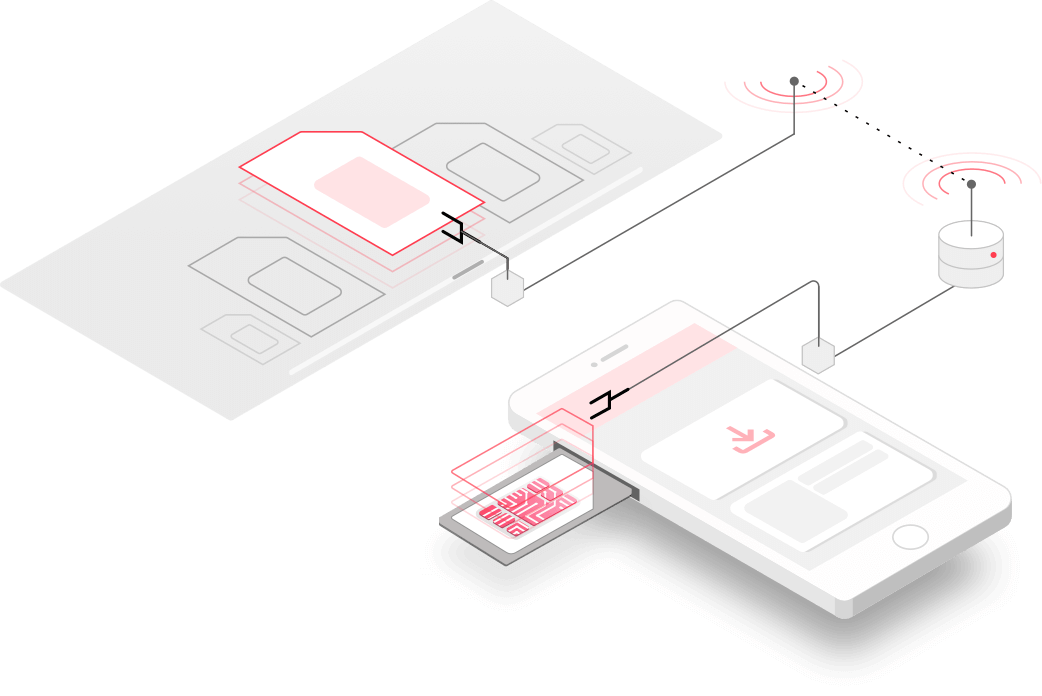
You might already know what an eSIM is, even if your phone doesn’t support the technology. It’s basically a dynamic SIM card that’s built right into your phone, programmable to work with multiple carriers or MVNOs. Instead of tediously swapping little plastic cards when you change carriers, eSIMs make shopping for a new plan almost as easy as installing an app. Not many phones support the relatively new technology, but one company has brought eSIM functionality to seemingly any Android phone.
How it works
Spotted by esper.io’s Mishaal Rahman, eSIM.me has built an eSIM-based SIM card. I know, that sounds counter-intuitive. A hardware SIM card would seem to defeat the purpose of a mutable eSIM, but it’s a novel approach that apparently works. However, it doesn’t have the same level of system integration that a more “traditional” built-in eSIM does.
Like all SIM cards, the eSIM.me has what is functionally a tiny computer of its own inside it, but the implementation here differs from your typical card. It has all the necessary hardware and software to run its own eSIM, meeting all the same specifications and delivering all the same functionality through software, capable of storing multiple different network profiles. And, surprisingly, the Android OS can talk to it sort of like it’s a “normal” eSIM through a set of APIs the platform has supported for years. While it can’t directly interface with Google’s SIM Manager app like a normal eSIM does (that means the normal eSIM management options you’d expect won’t appear in the Settings menu), you can configure up the required profiles using eSIM.me’s app, and the system sees each as a separate hardware SIM.
Although the full eSIM switching functionality doesn’t work on devices running other OSes, like iPhones, any device can make use of the currently active eSIM profile on the card — it’s basically Android-only, but in a pinch, you could use it in another device, so long as you don’t need to change profiles. You can also use it in a dual-SIM configuration, though you might run into other limitations depending on your device, support for dual-SIM features like dual active or dual standby, etc.
eSIM.me claims it should work with “any Android device,” but the required APIs do require at least Android 9 Pie in most cases to work — though Rahman does note that some manufacturers implemented the required standards as early as Android 7 Nougat. Rahman’s full examination of how it works has more technically interesting tidbits, like a secure authentication mechanism that lets eSIM.me’s app talk to the card while preventing other apps from doing the same (since that could be a security risk), and precisely why it can’t get the same level of system-integrated management that a built-in eSIM can.
Managing your SIM profiles in the app.
If you’ve never tried it, eSIMs are terribly convenient to use and a great way to get data when you’re traveling. Rather than having to go to a store, buying a SIM card, and selecting a plan or options for it, you can just pick a carrier and a plan from your phone and configure everything in software over just a few minutes. Shopping around for the right eSIM plan from another market can even offer a huge savings over a local plan. Rahman says some Canadians are importing these cards to use a Hong Kong-based plan. The hardest part is scanning a QR code. There are only two impediments, really.
First, the carriers you want to use need to support eSIMs while also not imposing any dumb eSIM-related requirements or limitations. Second, your phone has to have a built-in eSIM — or, at least, that used to be a requirement. While we can’t personally vouch for how well it might work, Rahman provides a few hearsay reports that eSIM.me’s hardware eSIM did decently in developer testing.
Cool idea, dumb pricing
Not everyone needs an eSIM, but if you know you’ll be in a circumstance where one might be handy, and your phone doesn’t have that functionality built-in, eSIM.me’s cards might be worth a look. The companion app itself can tell you if your phone is compatible, though most somewhat recent devices should be. However, the company did make a few dumb decisions to nickel-and-dime its customers to death.
Prices vary depending on too many dumb limits. Are you a “one phone” customer or a “one brand” sort of person? Do you need 2, 5, 7, 10, or 15 profiles, and do you know ahead of time?
Depending on how many devices you plan to use the eSIM.me with, the cost varies. The cheapest version apparently starts at $25 for a card that supports two profiles, locked to a single device. Transferring that license to a new phone costs $10, and this applies to all cards sold with device limits. For the big-boy version that does all the things with no dumb device or brand limitations and support for 15 profiles, you’ll spend $70 — ouch.
If you’re the root-and-ROM type, you might be able to bypass some of these weird and arbitrary feature restrictions. Speaking to Rahman, there’s an open-source eSIM management app that you’d be able to use without touching eSIM.me’s app, though using it to control the eSIM would require elevated permissions — root, in other words. But if eSIM.me simply imposes its device and registration limits through the app’s software, this could get around that, though we don’t know if any of these limitations are also enforced more direclty in hardware.
While eSIM.me can bring eSIM functionality to your eSIM-free phone, you’ll have to wade through a bunch of arbitrary limitations and options to find a card that fits your precise requirements or cough up $70 for the full-fat version that doesn’t have them. It’s a novel and interesting concept, but the features and functionality sound like they could be partly spoiled by the many limited options. After all, eSIMs were supposed to make things easier, and loading up all these extra caveats does the opposite.
WhatsApp is rolling out a new update through the Google Play Beta Program, bringing the version up to 2.22.11.10.
What’s new in this update? WhatsApp is now rolling out message reactions to more people and a new footer for end-to-end encryption to some beta testers today!
WhatsApp was working on a new footer to inform people that their chats, status updates, and calls are secured by end-to-end encryption by adding this information at the bottom of some sections. We have published an example in the article about the WhatsApp beta for Android 2.22.10.14 update and WhatsApp is releasing the new footer to some beta testers today:
As you can see in this screenshot, the new footer says that your personal messages are end-to-end encrypted. WhatsApp has also developed a new page that informs people what is secured by end-to-end encryption: text and voice messages, audio and video calls, photos, videos, and documents, location sharing, and status updates. The new page is also available right within WhatsApp Settings > Account > Security.
Note that the new footer has also been added at the bottom of your call history, status updates, and devices list and it is available to some beta testers today.
In addition, after the announcement by Mark Zuckerberg about message reactions, more people are now able to react to messages after installing this beta update. Enjoy!
After releasing the ability to add up to 512 people to groups and message reactions, WhatsApp keeps working on another important feature for a future update of WhatsApp beta for Android and iOS: a companion mode for multi-device.
COMPANION MODE
In the article about the WhatsApp beta for Android 2.22.10.13 update, we talked about the ability to link a secondary mobile device to your WhatsApp account. Thanks to this feature, you will be able to use the same WhatsApp account on more than 1 device at the same time.
This is already possible when linking a desktop device, but WhatsApp is working on bringing the ability to link a secondary phone for a future update:
As you can see in this screenshot, the company is working on a companion mode that allows linking a secondary device to another registered WhatsApp account. It seems that if you decide to link the secondary device to another registered WhatsApp account, you will be logged out from the current WhatsApp account configured on the secondary phone, in case you have two different WhatsApp accounts.
Since this feature is under development, further details are not available right now, unfortunately. What we can confirm is that the companion mode will also let us link Android tablets. Note that, even if the screenshot is taken from WhatsApp beta for Android, WhatsApp is also working on the same feature on WhatsApp beta for iOS. There will be another article when there is more information available, so be sure to frequently visit this website if you’re interested in using the companion mode.
It’s been almost two years since Google revealed its updated take on Android TV – and its first streamer with a remote. The Chromecast with Google TV ushered in a new era for the company’s streaming endeavors, but as we continue to move forward, time hasn’t been particularly kind to the Chromecast, and we’re itching to see what’s next for Google’s vision.
What the Chromecast with Google TV got right
Google did get a lot of things right with its first Android-based Chromecast. Its $50 price point offered an affordable point of entry to a brand new platform and allowed the hardware enough room to support most of the major standards.
The Chromecast also shipped with an easy-to-use and comfortable remote with a design that looks pleasant and works well for its intended use case.
The biggest thing that the device got right, though, was its software. Google TV came at just the right time with its “lifeboat” to streaming services, as we put it in our review. The UI made it easy to tell where content was, keep a central watchlist of what you wanted to check out, and recommend content based on your interests in a relatively clean way. While there are plenty of people who feel frustrated by the ads on the homescreen and the lack of focus on apps directly, I’ve personally always felt like Google has struck a decent balance here. The UI is clean and modern-feeling, unlike Roku, and keeps all of its advertising focus on content you can actually watch, unlike Fire TV which often steers into actual products.
And really, most of these points hold up to this day. Nearly two years later, Google TV continues to be a solid way to sift through the ever-growing list of streaming services and has expanded that support in the time since it launched. What the Chromecast is capable of is also still mostly on par with the competition in its price bracket.
But, it’s not all great news.
How has the Chromecast with Google TV aged?
There are plenty of things that are unfortunately not great about the Chromecast with Google TV two years later, and several of the biggest problems stem from one area — storage.
8GB of storage was not enough for a streaming stick in 2020, and it’s even worse a couple of years later.
The first and most obvious problem is the lack of space to install apps. This would have been fine back when streaming services were limited to Netflix, Hulu, Prime Video, and a handful of others, but there are so many more now. The Android TV apps for Netflix, Hulu, Disney+, Prime Video, HBO Max, and Peacock alone eat up over 530MB. That’s not including the inevitable cache data that they will build up either, not to mention the other major apps that are sure to be installed for many folks like YouTube, YouTube TV, Apple TV, and others. 8GB is not enough.
My personal Chromecast has been in use since September 2020, and it has just shy of 70MB available today. It is not nice.
Beyond that, there’s the dilemma of system updates. When most Chromecast owners have a mere 100–400MB to spare, there’s hardly any room for Google to work with when installing any kind of Android update on the Chromecast. The last update, rolled out in December 2021, weighed in at 158MB. It brought with it a tweak that opened up some more storage space, some HDR improvements, and a new security patch. But nearly six months later, that’s still the most recent update, and it’s almost surely due to the fact that Google knows a lot of people can’t install anything else.
This is restrictive enough for security updates, but it also limits how often Google can address bugs and other quirks that may arise. Worse yet, it also prevents any form of major system update – or at least makes it much more difficult. In 2022, the Chromecast with Google TV is still based on Android 10. Android 11 would be a waste of time, frankly, as it doesn’t deliver much to the TV experience, especially on the user-facing level. But Android 12 is a meaningful update that, frankly, just isn’t feasible with this storage constraint.
Google needs to address this problem, and at this point the easiest solution feels like a simple product refresh. A new Chromecast with Google TV packed with a 16GB storage chip and perhaps an updated chip that can handle the AV1 standard Google has been pushing so hard would extend this product’s life without much of an investment. Google could even up the price by a few dollars to cover these changes, and I don’t think it would come with much of a complaint.
But beyond storage, how is the product holding up? Fine … I guess. Performance is still middling for the most part, and it’s frustrating that some apps still lack features on Android TV OS versus other platforms. Hulu, for example, still lacks 4K playback. But that’s beyond the Chromecast’s responsibility. The remote is still a delight to use, and I’m glad that Google makes it so easy to buy replacements. My dog has destroyed two Chromecast remotes over the past two years, and being able to order a replacement from the Google Store really eases that frustration. That’s as opposed to my Hisense TV, which had me turning to eBay for a replacement remote that took quite a while to arrive.
Google has also done quite a bit to improve the experience of using Google TV over the past couple of years, independent of the major system updates. Kids Profiles, more live content on the homescreen, a new phone-based remote, better cloud gaming support, and other quality of life updates have only improved the experience. But we’re still waiting on proper profiles and support for Google’s own new Nest cameras — it’s frankly ridiculous that this still isn’t available. Fast Pair is also supposedly coming soon.
The Chromecast was just the start — It’s time for something new.
Two years later it’s abundantly clear that Google TV is the best part of the new Chromecast, as the hardware itself hasn’t aged gracefully. When the Chromecast debuted, it was a product that was an easy, condition-less recommendation. That’s no longer the case.
It’s clear that something needs to change. As we’ve said in the past, we’d love to see Google deliver a “flagship” for its platform, an example that others can turn to and where Google TV can truly shine. But it seems that isn’t what Google has in store. Rather, the next step for Google TV seems to be a Chromecast “Lite.” While Google has yet to announce such a product, a recent report pinned down a 1080p-only Chromecast that would serve as a lesser version of what we have today.
It’s dismaying to see Google go further downstream, but it could make sense. Simply refreshing the existing Chromecast with more storage and perhaps a better chip would go a long way in putting breathing room between the two products. Going all-in on the smart TV market, too, seems like the smart move for Google on the higher-end too. That’s where the real numbers are right now.
Whatever comes next, something has to happen. Google TV is a great product, and one that does a great job in addressing problems consumers actually have today. But the Chromecast just can’t carry that weight alone anymore.
Earlier this week, Google started beta testing Android 13 for Android TV. Similar to previous years, a system image is available for the ADT-3 Developer Kit.
The beta is an opportunity for you to test your apps and provide feedback on the latest release. Further customizations in Android to improve the experience and compatibility on TV will be introduced with the each release.
Given the different experiences, there are separate testing paths for Android TV and Google TV. You can install a Google TV Beta 1 system image on the ADT-3 Developer Kit today.
Meanwhile, both an Android TV 13 and Google TV beta testing experience is available via the Android Emulator for TV. Google has identified the following issues and it does not make for the most stable experience:
When Bluetooth headphones are connected, AV playback on some apps does not work.
In some cases when trying to pair Bluetooth devices, pressing the side button on the ADT-3 device does not activate a Bluetooth device search. If remote pairing is lost, you can work around this by using ADB commands to simulate remote input. Alternatively, you can re-flash the unit.
Remote control buttons can’t be reconfigured using the Remote & Accessories menu.
The option to change HDMI-CEC control is currently missing from the Remote & Accessories menu.
When casting to 4k TVs, only the top left quarter of the image is shown.
In some cases when the ADT-3 device is connected to an LG TV, the remote control does not work.
When using the Google Play Movies app, 4K playback is corrupted by a gray screen and noise.
For iOS devices, the Google Home app fails to connect to the ADT-3 device. To work around this issue, use the Google Home app on an Android device or the ADT-3 remote control.
This Beta 1 was released (h/t Android Police) on May 4, or just over a week after the Pixel version became available. Stay tuned as we dive into what’s new.
In this week’s top stories: Google acquires microLED startup Raxium, password replacement ‘passkeys’ previewed, Mecool KD3 reviewed, and more.
After initially being rumored in March, Google announced this week that it would be acquiring Raxium, an “innovator in single panel MicroLED display technologies.” Reading between the lines a bit, it seems this may be part of Google gearing up its augmented reality hardware team.
This news comes as details of Meta’s competing efforts leaked earlier this week. Specifically, Meta is reportedly launching a second-generation mixed reality headset, which is geared towards competing with laptops/Chromebooks, by 2024. That’s the same year Google is reportedly releasing its first unit, codenamed Project Iris.
If you’ve ever struggled to remember a password, there may be good news for you in the near future. Google has shown off its work on “passkeys” which aim to be a secure replacement for user-managed passwords on Chrome and Android.
Your Android phone will store a “passkey” that’s used to unlock an online account (in Google Chrome). Instead of entering a password to sign into a website or app, you just unlock your mobile device. Passkeys are synced to the cloud (Google Account) and transferred when you get a new phone or if it’s ever lost.
If you’re in the market for a Google TV streamer but have been wary of the Chromecast’s storage woes, you may want to look into the Mecool KD3. As laid out in our review, the dongle is a meaningful upgrade over the Chromecast with Google TV, thanks to its slightly newer chip and easily expandable storage.
[…] Mecool sells the KD3 with an optional “OTG” cable that adds a full-size USB port to the charging cable on KD3. This effectively allows any form of USB storage, such as a cheap flash drive, to act as expanded storage. 8GB is still limiting, but this $1 upgrade will certainly ease that pain quite a bit. By contrast, Google offers no way to expand the Chromecast’s storage, and solutions similar to this tend to be pretty messy with the Chromecast.
The latest Android Auto update, version 7.6, rolled out to customers this week, though the outward facing changes seem to be somewhat minimal. It’s possible more features of the update will steadily become available in the coming days.
While we’re waiting eagerly for Google’s next redesign to Android Auto, version 7.6 does not seem to deliver that overhaul. Rather, this update is likely rolling out to squash bugs with apps, Google Assistant, and other portions of the Android Auto experience. If we had to take a guess, it might also be assisting in the rollout of quick replies, which started showing up for beta users last week.
This week also saw the beginning of the end for the YouTube Go app for low-end phones, set to shut down by the end of the year. Google now believes the main YouTube app has been optimized enough that affordable phones, such as those that would run Android Go, can run that full-fat version.
As such, a dedicated app is no longer needed, especially a Go client that lacked the “ability to comment, post, create content, and use dark theme.” In fact, YouTube Go was last updated in October 2021, so the writing was on the wall. It currently has over 500 million installs
For most of the world, Google Play Points is structured into four levels. Play Points users on the top Platinum tier are now being offered a hardware perk in the form of Google Store discounts.
Update 5/7: Since we published yesterday, some Gold level members have chimed in about getting this perk, while another person in the Gold tier said they received an offer for a free Chromecast with Google TV.
Thanks commenters and Michael
Surprise! As a special treat for being Play Points Platinum, enjoy $40 off one of these devices at the Google Store until June 6:
Original 5/6: In an email to Platinum members in the United States this afternoon, the Play Points program is offering $40 off three products:
Logistically, this is handled via promo code in the email that expires June 6, 2022 at 11:59 p.m. PT. This discount is applied at checkout after entering.
Existing Platinum perks include getting 1.4 points for every $1 spent, in-game points events, movie and book multipliers, Platinum weekly prizes, and premium support. You must earn over 3,000 points to reach this level. The Platinum level is preceded by Gold, Silver, and Bronze, while South Korea also offers a Diamond level.
Overall, these hardware discounts are one of the better perks of being part of Play Points and buying content through Play Movies & TV — soon Google TV — or Play Books. It’s also an upside of using Google Play billing.




![Play Points pay off as Gold/Platinum tiers get free Chromecast, Pixel Buds discount, more [U]](https://korevibes.com/wp-content/uploads/2022/05/google_play_points_1.jpg)


